FreeCell
About FreeCell
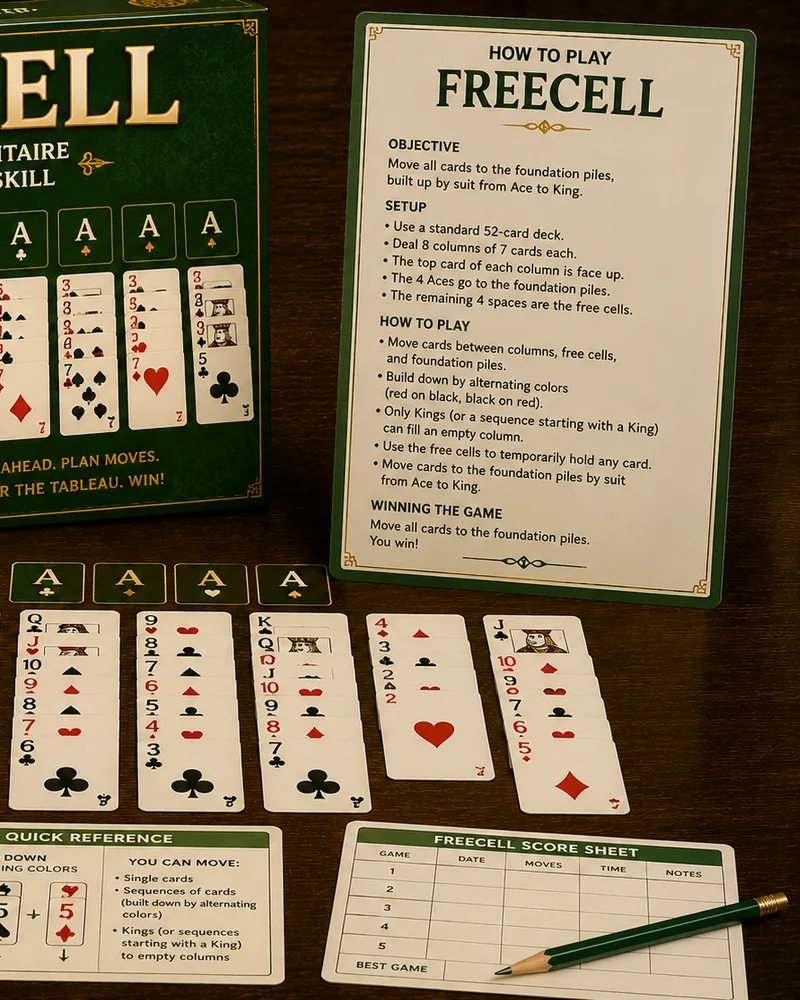
FreeCell is a solitaire card game where nearly every deal can be won, and every card is dealt face up from the start. That means there's no hidden information and almost no luck: if you lose, it's because of your own choices, which is exactly what makes it the perfectionist's solitaire.
Its signature feature is the four free cells, temporary spots that each hold a single card, giving you room to maneuver. Every move here is one card at a time, so deciding when to park a card in a free cell and when to hold back is the whole game. It came bundled with Windows in 1995 and built a devoted following.
You can play FreeCell free in your browser with no download. Because everything is visible, it rewards planning: the best players look at the whole board before touching a single card. It's a deeply satisfying game of pure skill, and finishing a tough deal feels genuinely earned.
Controls
You play by tapping or clicking cards, not dragging them. Tap a card to pick it up, or click it on a laptop, then tap or click where it should go: a free cell, a foundation, or another column.
The board has three areas, and the free cells are the key:
- The tableau and foundations work like most solitaire: build the tableau columns downward in alternating colors, and build the four foundations upward by suit from ace to king.
- The free cells are four spots that each hold one card. Every move is a single card, so parking one in a free cell is how you set it aside to reach the card buried beneath it.
Every card is face up from the start, so there's no hidden information, and nearly every deal is winnable.
A Help button explains the rules on demand, and Hint highlights a move you can make right now if you get stuck.
Tips
- Plan before you move anything. Since all cards are visible, look at the whole board and map out a sequence of moves first, because a move that seems helpful can block a card you need later.
- Keep your free cells empty. Every card you park in a free cell is a cell you can't use for anything else, so avoid filling them unless you have a clear plan to move that card back out.
- Free your aces and low cards early. You need aces on the foundations to start building, so prioritize digging out aces and twos, which also opens up the columns above them.
- Work toward an empty column. An empty tableau column is powerful, since any card can move into it, giving you an extra spot to shuffle cards through, so clearing one is often worth real effort.
- Don't rush cards to the foundations. A card sent up to the foundation can't come back to help arrange the tableau, so keep cards available in the columns until you're sure you won't need them.
- There's no undo, so slow down before you move. Every card placement here is final, so work out your next two or three moves before you touch a card, since there's no backing out of one that turns out wrong.
Frequently asked questions
Is FreeCell free to play?
Yes. You can play as many deals as you want with no download and no account.
How do you play FreeCell?
You build the four foundations up by suit from ace to king, using the tableau, where cards stack downward in alternating colors, and four free cells that each hold one card. All cards are face up, so you can plan every move.
Is every FreeCell game winnable?
Nearly every deal can be won with correct play. Because all cards are visible from the start and there's almost no luck, a loss is usually the result of a misstep rather than a bad deal.
What are the free cells for?
The four free cells are temporary holding spots for single cards. Every move here is one card at a time, so a free cell is how you set a card aside to reach the one buried underneath it.
Can I play FreeCell on my phone?
Yes. It runs in any modern mobile browser, and you move cards by tapping rather than dragging, so it works well on phones and tablets.
How do I get better at FreeCell?
Plan your moves before touching a card, keep your free cells empty for maneuvering room, and dig out aces early. Don't rush cards to the foundations, and think twice before every move, since there's no undo to fall back on.
More like this
Popular right now 🔥
All →
Klondike Solitaire
Sudoku
2048
Chess
Ludo
Snake
Block Puzzle
Minesweeper
Checkers
Spider Solitaire
Mahjong Solitaire
Snakes & Ladders
Word Search
Connect Four
Brick Breaker
Tic-Tac-Toe
Bubble Shooter